Chrome_Side_Translator
Side Translator
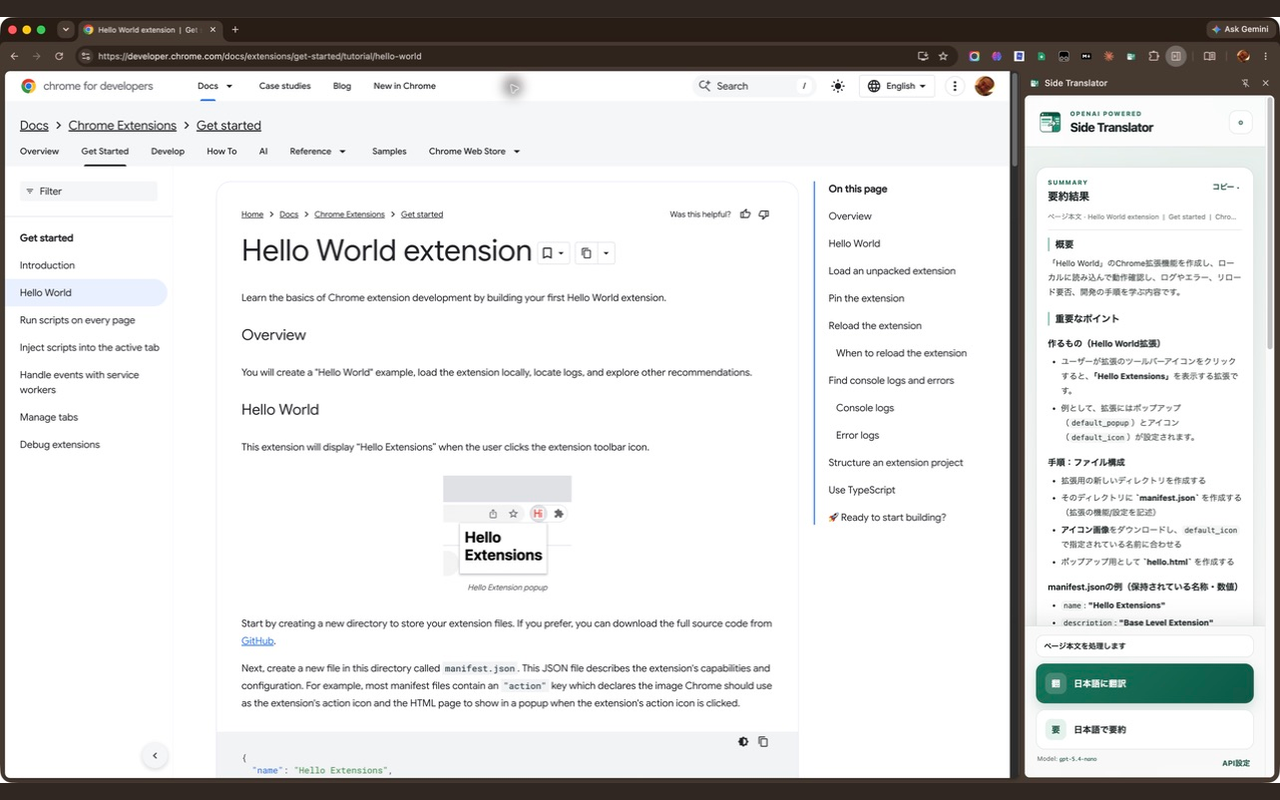
A Manifest V3 Chrome extension that opens in the browser side panel and uses the OpenAI Responses API to translate or summarize the main content of the current page in Japanese.
Install Side Translator from the Chrome Web Store
Features
- Opens from the extension toolbar button in Chrome’s side panel.
- Extracts likely article or main-page content while removing headers, footers, navigation, advertisements, forms, and similar chrome.
- Shows Gmail-specific actions when no text is selected: summarize the full thread, summarize the latest message, translate the latest message, or create a reply draft from user-provided requirements.
- Translates the extracted content into Japanese while preserving its structure.
- Summarizes the extracted content in Japanese with an overview and key points.
- Lets users customize the translation, summarization, and reply-drafting instructions from the settings page.
- Keeps up to 50 recent results in local history for reopening, copying, or deleting. Source text and reply requirements are not retained.
- Uses
gpt-5.4-nanothrough the OpenAI Responses API. - Stores the user-provided API key only in
chrome.storage.local. - Renders a safe Markdown subset with DOM APIs, without executing webpage or model-generated HTML.
- Requests access to HTTP and HTTPS pages so the persistent side panel continues to work after tab switches and navigation.
Install for development
- Open
chrome://extensionsin Chrome. - Enable Developer mode.
- Select Load unpacked.
- Choose this repository directory.
- Pin Side Translator to the toolbar if desired.
Chrome 116 or newer is required.
Configure
- Click the extension toolbar button to open the side panel.
- Open API settings from the gear button or the setup notice.
- Paste an OpenAI API key and select Save.
- Return to a normal
httporhttpspage and choose Translate to Japanese or Summarize in Japanese.
The extension sends only the extracted main text to https://api.openai.com/v1/responses. The page title and URL stay local and are used only for the result label. Avoid using it on pages containing confidential or sensitive information.
Chrome grants the extension access to HTTP and HTTPS pages so it can extract the current page even when the side panel was opened from Chrome’s side-panel menu or kept open during navigation. The extension does not inject a persistent content script and only reads a page after the user selects translate or summarize.
Privacy and API-key notes
The API key and result history are stored in Chrome local extension storage, not sync storage. History contains the result, page title, operation type, timestamp, and display metadata; it does not contain the extracted source text, page URL, or reply requirements. Client-side storage is still accessible to a person or program with sufficient access to the Chrome profile or extension runtime. For a multi-user production deployment, route requests through an authenticated backend and keep the OpenAI API key on the server instead.
Content extraction
The extractor scores semantic candidates such as article, main, and [role="main"], considers text length and link density, removes common non-content elements, and sends at most 100,000 characters per request. Extraction is heuristic and can be imperfect on highly interactive applications or pages with unusual markup.
On Gmail, a text selection continues to take priority. Without a selection, the extension detects the open conversation, expands it, and extracts either every visible message or the latest message according to the selected Gmail action. Message bodies are sent with available sender, recipient, date, and attachment-name metadata; attachment contents are not read. Reply drafting sends the full extracted thread together with the user’s reply requirements and returns copyable draft text; the extension does not send the email.
Chrome internal pages, the Chrome Web Store, local browser pages, and other restricted URLs cannot be inspected by extensions.
Development
Run the dependency-free unit tests with:
npm test
After changing extension files, select Reload for Side Translator on chrome://extensions.